Twelve-pixel grey text, meet 180 %. The page will not notice.
Grow the words, not the layout: images, columns and menus stay where they are, and every site remembers the size you picked. Add a magnifier lens for the fine print and a contrast mode for the glare — all inside your browser.
Add Bigger Text to Chrome — free
- Text 100–300 %, layout unchanged, remembered per site
- Lens ×1.5–×4 on Alt+Shift+M
- High contrast, dark, yellow on black, grayscale
Ctrl + makes the page huge and still unreadable
Browser zoom scales everything: the sidebar swallows the article, the menu wraps, horizontal scrolling appears, and the text is still thin grey on white. Zooming back out to see the layout means squinting again. Operating-system magnifiers enlarge the whole screen and lose the context; a contract's clause 3.2 is as small as ever once you move the mouse.
A+ until it reads well
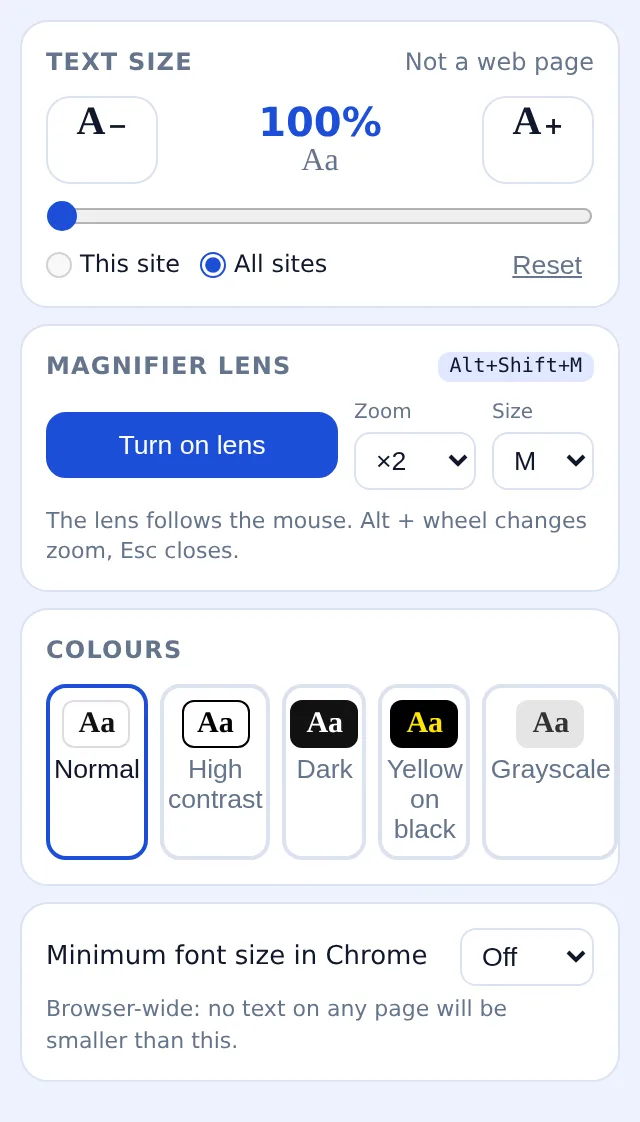
Press A+ or drag the slider — 115, 150, 200, up to 300 %. Only the text grows; columns, images and navigation keep their size and place. Choose «this site» or «all sites»; the site remembers.
Lens for the fine print
Alt+Shift+M opens a round lens showing a live, magnified copy of what is under the cursor. Alt + wheel sets ×1.5 to ×4, the popup sets the lens size, Esc puts it away.
Turn the glare down
Pick high contrast, dark with photos kept natural, yellow on black or grayscale. Set Chrome's own minimum font size from the same popup so no site can go below it.
What you end up with
Every site at the text size your eyes need — the news at 130 %, the utility's terms at 180 %, the rest untouched — with the page's layout exactly as its designers built it. Shortcuts Alt+Shift+. and Alt+Shift+, adjust without opening anything. Sizes, modes and lens preferences live in chrome.storage; the extension reads nothing from pages and sends nothing anywhere.
Low vision, online banking
Statements at 200 %, dark mode on, the lens for the reference number. The bank's layout, with its narrow columns, stays intact.
Small laptop at the kitchen table
Recipe sites at 150 %, remembered. No more leaning in to read the oven temperature between ads.
Reading contracts after a long day
The supplier's terms are 12-pixel grey. 180 % and yellow on black, clause by clause; the lens for the footnote about exit fees.
Compared with the ways people usually enlarge text
| Browser zoom (Ctrl +) | Enlarges the whole layout, breaks columns, adds horizontal scrolling | Bigger Text: Text only, layout unchanged, size remembered per site |
|---|---|---|
| Operating-system magnifier | The whole screen moves; context is lost | Bigger Text: A lens where the cursor is, the rest of the page at normal size |
| Reader mode | Strips the page; not available on forms, tables and web apps | Bigger Text: Works on the real page, including forms and dashboards |
FAQ
How do I make text bigger on a website without zooming?
Install the extension, press A+ or set the slider; only the text scales. The size is remembered for that site, or for all sites if you choose that scope.
Does it work on every website?
On ordinary web pages, yes — news, shops, banking, documentation, web apps. Chrome's internal pages and the Web Store cannot be modified by extensions.
Is there a screen magnifier?
Yes: Alt+Shift+M opens a lens that follows the mouse with a live magnified copy of the page, zoom ×1.5–×4 with Alt + wheel. The first few lens openings are free; ExtSpace Pro removes that limit.
Can I set a dark or high-contrast mode?
The popup offers high contrast, dark (inverted, photos kept natural), yellow on black and grayscale. Switch back to none at any time.
Does it read my pages?
No. It changes styles inside the page and stores your sizes and modes in chrome.storage on this device; nothing is sent anywhere.

Bigger Text
Free Chrome extension that enlarges only the text of a page (100–300 %), remembers the size per site, adds a magnifier lens that follows the mouse and high-contrast, dark and yellow-on-black modes. Alt+Shift shortcuts.
Add Bigger Text to Chrome — free Font Changer — Font Size & Dyslexia Font